Introductions and Building Community
Another feature of a successful webinar is the ability to utilize group dynamics to foster a sense of community and cooperative learning. As you begin the webinar, you’ll want to focus on defining the group, and letting learners know what they will complete together over the course of the session. Dr. Susan Weinschenk states that, “You don’t have to feel good about the group with a group activity in order to be more cooperative. Just the act of doing a synchronous activity seems to strengthen social attachment amongst group members.” [1] By fostering a sense of camaraderie from the very beginning, you let your participants know that they are now a part of a community of learners that they can rely on over the course of the session and hopefully beyond.
First Impressions
In that most folks tend to arrive to the session early, you may want to consider placing a timer or welcome message on the screen let users know when the presentation will begin. Also make sure that your screen is set up in a self-evident way in terms of what participants are supposed to do so that latecomers can simply dive right in. This is another instance where a facilitator or producer can help immensely – they can greet late comers and get them caught up while you continue to present.
Introductions
Sharing the Game Plan
Once introductions are out of the way, you want to state the agenda and articulate your expectations of participants throughout the session. Let users know exactly what they’ll be doing over the course of the session and how you would like them to engage with some material. That way, at any given time during the webinar, they will know exactly where they are, what they’ve done, and what’s to come.
In the previous module we discussed the process of activating prior knowledge as the second step of Gagne’s Nine Events of Instruction. One simple activity that will allow learners to share what they know and what they would like to know is to have them complete a KWL chart. The concept of the KWL chart was created by Donna Ogle as a means of helping learners to define what they know, what they want to know, and once the lesson is complete, what they learned. [4]
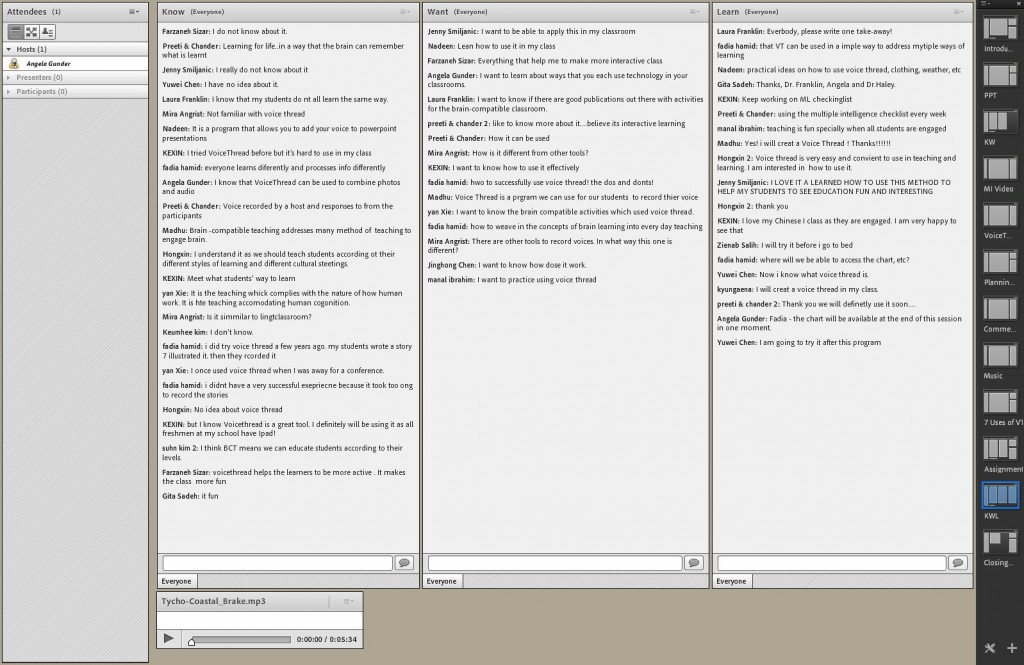
Create chat boxes or note areas for your participants to fill in the K and the W blocks on the KWL chart. This will help you to complete the first three steps of Gagne’s nine events of instruction in that you will gain learner attention, inform the learner of the objectives for the lesson, and stimulate prior knowledge. Having learners complete the L block of the chart at the end of the lesson will allow you to assess their performance and enhance retention/knowledge transfer, which covers the last two steps of Gagne’s nine events of instruction. You may consider showing participants the K and W blocks as they fill out the L block so as to demonstrate the change that has occurred over the course of the webinar.
In the next module, we will offer you a bevy of sample activities that you can incorporate into your online presentation as a means of keeping your learners interested and invested in the topic.
- Weinschenk, S. (2011). 100 things every designer needs to know about people. Berkeley: New Riders.↑
- Weinschenk, S. (2011). 100 things every designer needs to know about people. Berkeley: New Riders.↑
- Domizio, P. (2008). Giving a good lecture. Diagnostic histopathology, 14(6), 284-288. Retrieved from http://www.diagnostichistopathology.co.uk/article/S1756-2317(08)00068-6/abstract↑
- Ogle, D. (1986). K-w-l: A teaching model that develops active reading of expository text. Reading teacher, 39, 564-570. Retrieved from http://www.jstor.org/stable/20199156↑